Calculate Any Flop, Turn, or River, Even in Multiway Pots!


Building postflop simulations for PLO is computationally demanding.
Even relatively standard 100 BB spots require significant computing power, while deep-stacked multiway situations in PLO5 and PLO6 become dramatically more complex.
With three game variants, multiple formats, stack depths, and betting scenarios, the number of possible simulations is virtually endless. The PLO Genius library already holds over 10.5 million solutions, but it's impossible to cover every situation in advance.
That's why we've introduced on-demand solving, letting PRO and EDGE users request custom flop, turn, and river calculations across PLO and PLO5, and - for PRO users - PLO6.
How On-Demand Solving Works
The feature is powered by the recently introduced coin system. Every PRO and EDGE subscriber receives a monthly allocation of coins (1000 and 200 respectively), which can be used to request calculations that are not yet available in the library.
If you run out, you can purchase additional coin packages at any time - purchased coins never expire.
Costs scale with complexity: the cheapest flop calculations start at 100 coins, while individual turn and river calculations start at just 2 coins.
The most common scenarios — like 100 BB single-raised pots for mid stakes that play heads-up postflop — are already well covered by our library, and we add new simulations every week.
On-demand solving lets you go further: analyze any spot immediately, without waiting for it to become part of the public library.
There are two main ways to use it: creating a single custom calculation, or solving a full multiway spot.
Option 1: Create a Custom Calculation
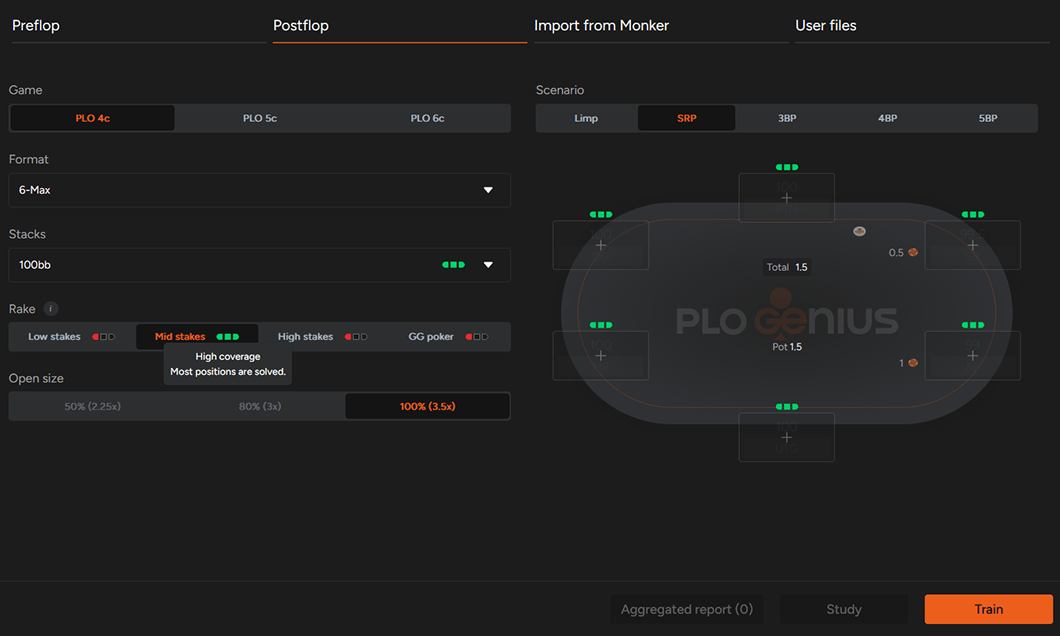
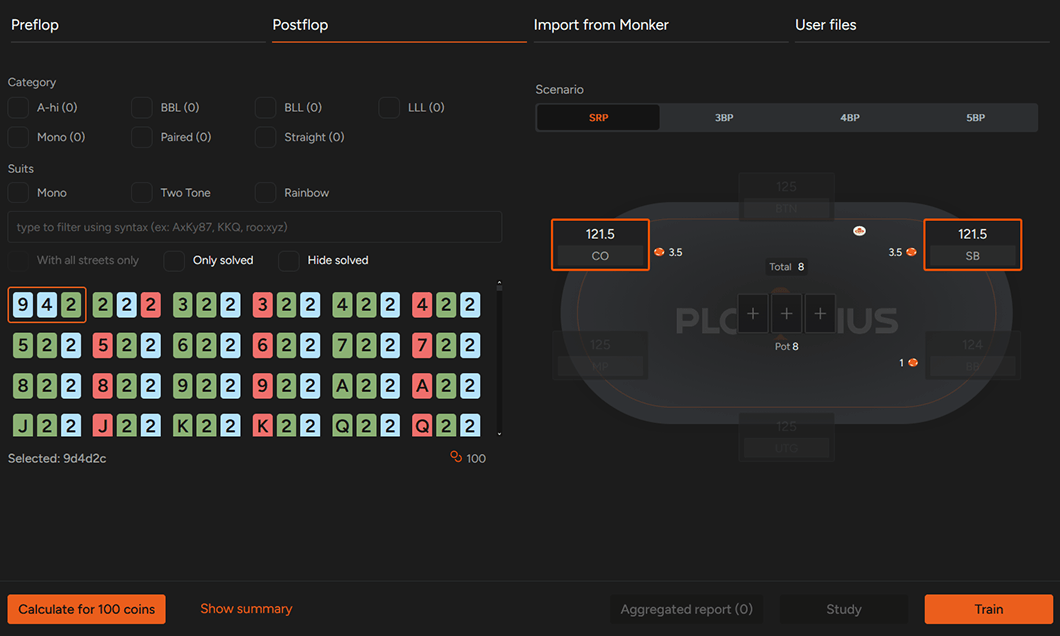
Suppose you want to analyze a 125 BB CO vs SB single-raised pot. Select the game variant, format, stack size, rake structure, and preflop scenario, then choose the positions involved.
The final step is selecting the flop (or multiple flops) you'd like to calculate. Once everything is set, simply submit the request.
How Long Does Solving Take?
The simplest flop calculations — like the one above — are usually completed within around 30 minutes, while the most computationally demanding requests may take a few hours.
You don't have to refresh the page to check whether your calculation is ready. Once it's completed, you'll receive a notification via the bell icon in the top-right corner of the dashboard.
Continue to Any Turn and River
Every calculation you've requested is stored in the My Games section.
Open any completed simulation, enter the study view, and calculate any turn card you'd like. Once the turn has been solved, you can continue with any river card.
This lets you build exactly the runout you're interested in, instead of being limited to precomputed solutions. Turn and river calculations are much faster than flops, usually finishing within just a few minutes.

Studying Individual Runouts
After opening a solved flop, you'll see the postflop strategy.
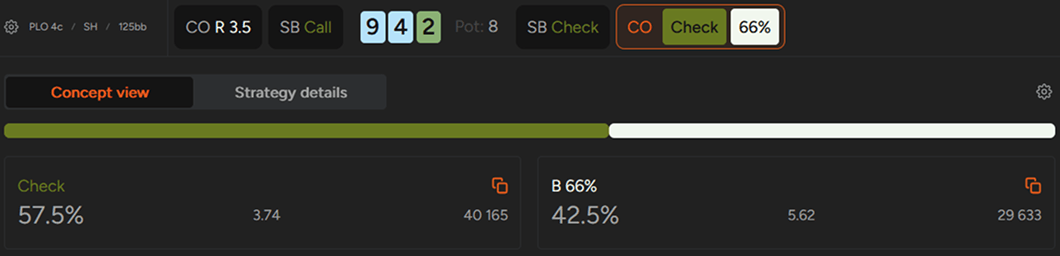
To keep the interface clear, only actions that occur with meaningful frequency are displayed. In the example below, the out-of-position player (SB) almost always checks, so checking is the only available option. The in-position player (CO) can either check or bet two-thirds of the pot.
Once you've selected the actions for both players, you'll be able to choose the turn card you'd like to calculate.
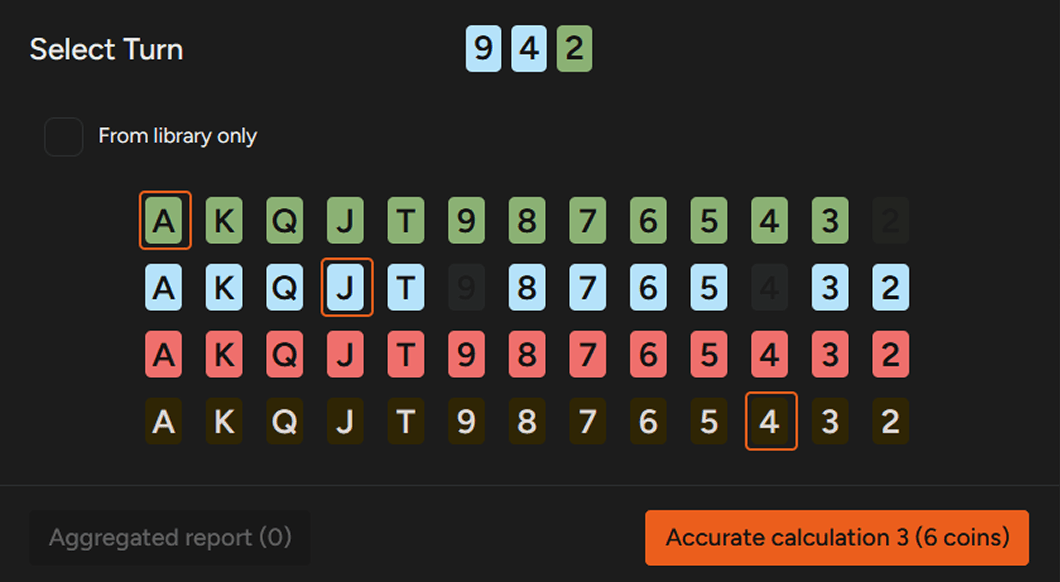
After the calculation is complete, you can examine how the strategy changes across different runouts — for example, when:
- an Ace introduces a second flush draw,
- a Jack completes the front-door flush draw,
- or a Four pairs the board.
From there, you can calculate any river card and keep exploring the exact line you're interested in.
Option 2: Solve Multiway Spots
On-demand solving isn't limited to heads-up situations. You can also analyze virtually any multiway scenario.
For example, suppose you want to study a 100 BB 6-max single-raised pot. Simply select the appropriate game format and preflop settings, then enter the study mode. From there, define the action sequence — for example, UTG raises, MP calls, CO calls, and BB calls.
Once the preflop action is complete, you'll choose the flop you'd like to calculate, and the rest of the workflow is identical to the previous example.
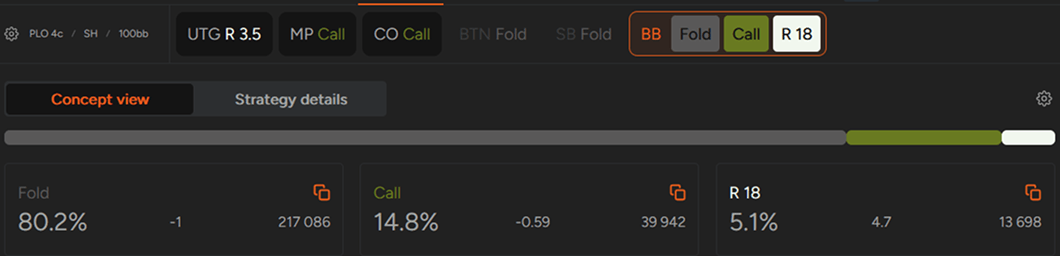
Every calculation requested by a user is added to the public library once completed, allowing it to grow continuously and benefit the entire PLO Genius community.
Multiway turns and rivers
Custom turn and river calculations were initially limited to heads-up situations. They are now available for multiway pots as well, across all three supported games — PLO, PLO5, and PLO6. As long as a spot can be created using the available PLO Genius presets, you can calculate every postflop street, regardless of whether the pot is heads-up or multiway. Depending on the selected game and configuration, the presets allow you to include multiple preflop callers, so you can study situations such as a raise followed by several calls and continue analyzing the hand through the flop, turn, and river.
The process is the same as in the heads-up case. Start by setting up a supported preflop configuration and requesting a custom flop calculation. You can then select the turn card you want to analyze before continuing the calculation on a specific river. The feature covers the different stack depths, positions, and numbers of players supported by the presets.
Multiway pots contain more ranges and possible interactions than heads-up situations. As the board develops, the strategies of all players may shift significantly depending on the cards dealt. Custom turn and river solving allows you to examine these changes in detail: how ranges narrow after the flop, how a particular turn affects each player's strategy, and how the optimal approach evolves on different rivers. Since turn and river calculations cost only a fraction of the coins needed for an additional flop, exploring multiple runouts on the later streets doesn't require a separate flop calculation each time.
Study Exactly What You Need
We continue expanding our postflop libraries, and for many players the existing database already covers the vast majority of important situations.
On-demand solving takes this one step further. Instead of waiting for a particular spot to be added to the library, you can request it immediately and continue exploring any turn or river that follows. Combined with aggregated reports and the option to import your own hands, it lets you build a study routine around the spots from your own sessions.
Whether you're studying PLO, PLO5, or PLO6, on-demand solving gives you complete control over what you analyze, allowing you to focus on the situations that matter most to your own game.
Ready to stop guessing and start solving the exact spots you play? On-demand solving is part of the Edge and PRO plans of the PLO Genius solver; take a look at our pricing page to find the plan that fits your study needs. The free Starter plan covers 100bb preflop for heads-up and 6-max, in four-card and five-card PLO, with the trainer and no time limit.

Subscribe to our newsletter
Stay up to date with our new features
Join our community on Discord!
Want to learn more about PLO?
Catch up on our latest articles, updates, and insights

How to Get More Out of PLO Genius
Get more out of your PLO Genius study sessions with these practical tips.

How Rake Changes Your PLO Preflop Strategy: Low vs. High Stakes
Does higher rake mean you should play tighter in PLO?

How Stack Depth Affects PLO Preflop Strategy
What changes preflop when stacks go from 100bb to 200bb in PLO: RFI, 3-betting in and out of position, with numbers from the Compare tool.
