How to Get More Out of PLO Genius


Poker tools, especially solvers, tend to become more powerful - and often more complex - with each update. PLO Genius is no exception. Over time, we’ve added a wide range of games, formats, settings, and study features.
With so many ways to study in the app, we’d like to highlight a few practical tips that are easy to overlook.
Here are a few things worth knowing to help you identify mistakes, understand solver strategies, and make your study sessions more effective.
The Right Plan Starts Preflop
Many of our users are unaware that PLO Genius has a Hand Import feature that analyzes your preflop play and compares it with the solver’s strategy. It’s one of the most efficient ways to study: instead of browsing through random hands, you review your own decisions to see what you did well and where you could improve.
That’s not all, though. We’ve recently added Train Mistakes, a feature that lets you practice the exact spots where you deviated from the solution. This helps you work directly on the mistakes you made at the table.
How can you use your own hands to get more out of your study sessions?
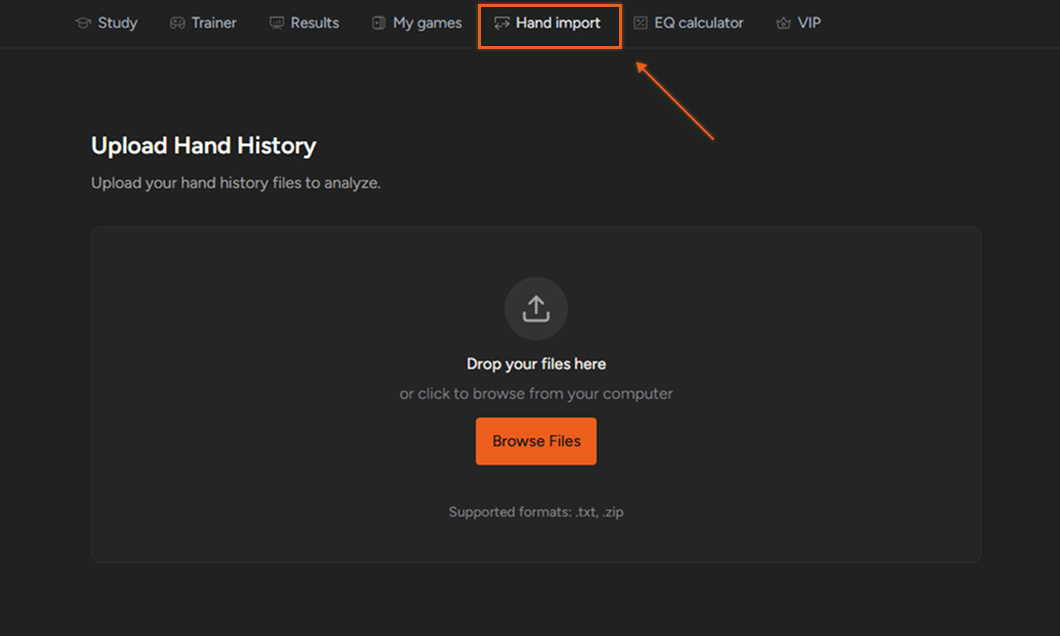
You’ll find Hand Import in the app’s navigation bar. Open the tab, drag and drop your hand history files or upload them from your computer, then select the settings that match your game. Once the import is complete, you can review the hands you’ve played.
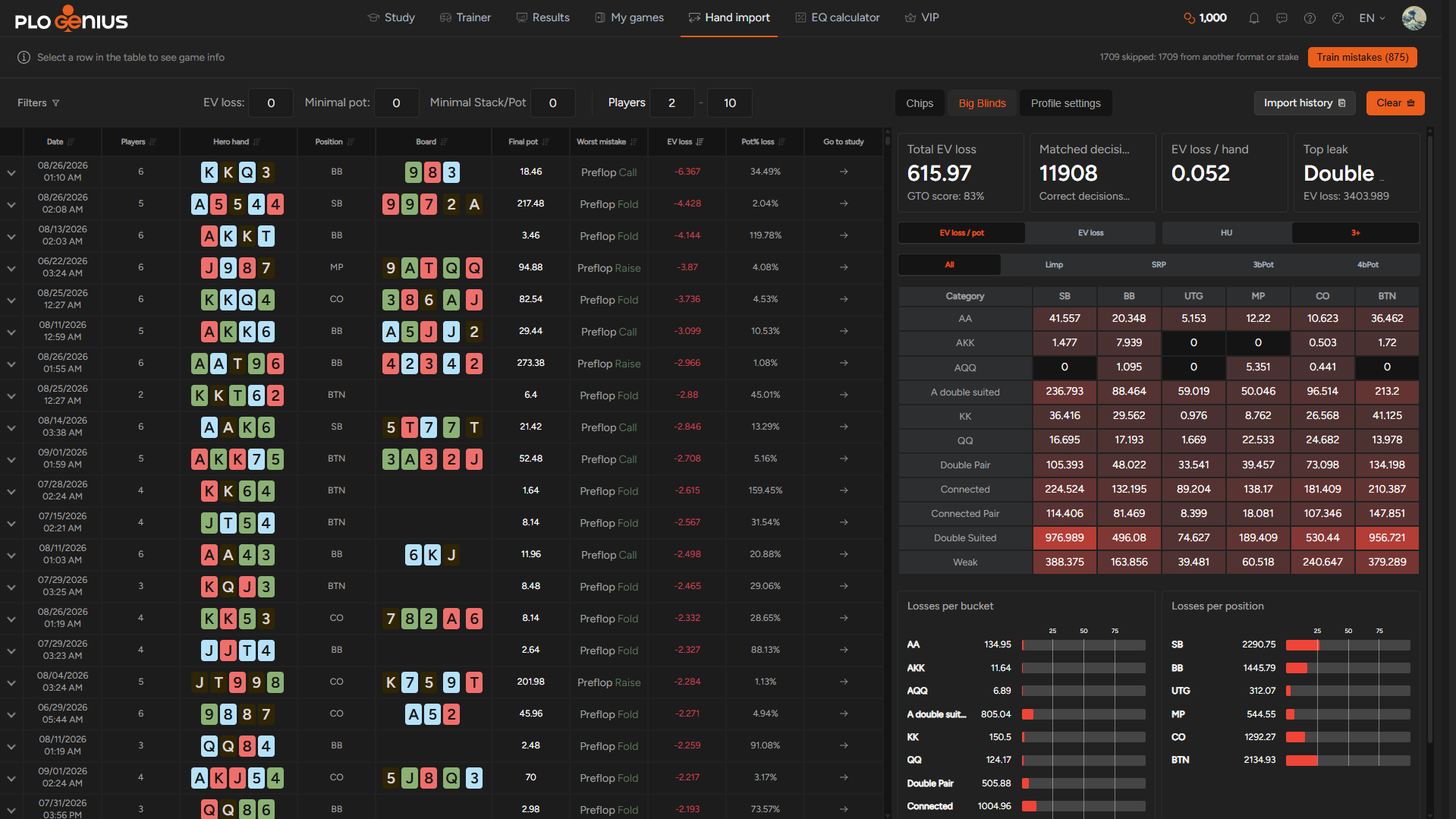
After the upload, you’ll see a screen like this, showing your imported hands. You can sort them by date, hero hand, position, or EV loss. Studying this way helps you improve by reviewing the hands you actually played, often while you still remember why you made a particular decision.
You can then use Train Mistakes to practice the exact spots where you deviated from the solution and put what you’ve learned into practice.
The process takes just two steps: upload the hands you want to review, then click the Train Mistakes button to start training.
Importing hands and practicing your mistakes is a straightforward, effective way to strengthen your preflop game. You can identify which hand categories you play too passively and which ones you tend to overvalue. Whatever your preflop leaks may be, these features help you spot them and work on correcting them.
Now, let’s look at how you can improve your postflop skills.
Check Your Bet/Fold Range to Find Bluff Candidates
Choosing the right combos to bluff is an important part of playing well. The complexity of PLO means that even common spots involve ranges containing thousands of combos, making it harder to identify the best bluff candidates.
Each postflop solution lets you explore the game tree and see how different hands are played at each decision point.
So, how do you identify suitable bluffs at a particular point in a hand?
Let’s look at a real hand played by one of our users. In a single-raised pot between the Small Blind and the Big Blind, our hero was in the Big Blind and called a flop c-bet. The Small Blind then checked the turn. Which hands should hero bluff with?
You can narrow down the candidates in two steps. First, look at the hands that bet and then fold to a raise. This bet/fold range is a useful starting point for finding bluffs, although it can also include hands that bet for thin value or protection.
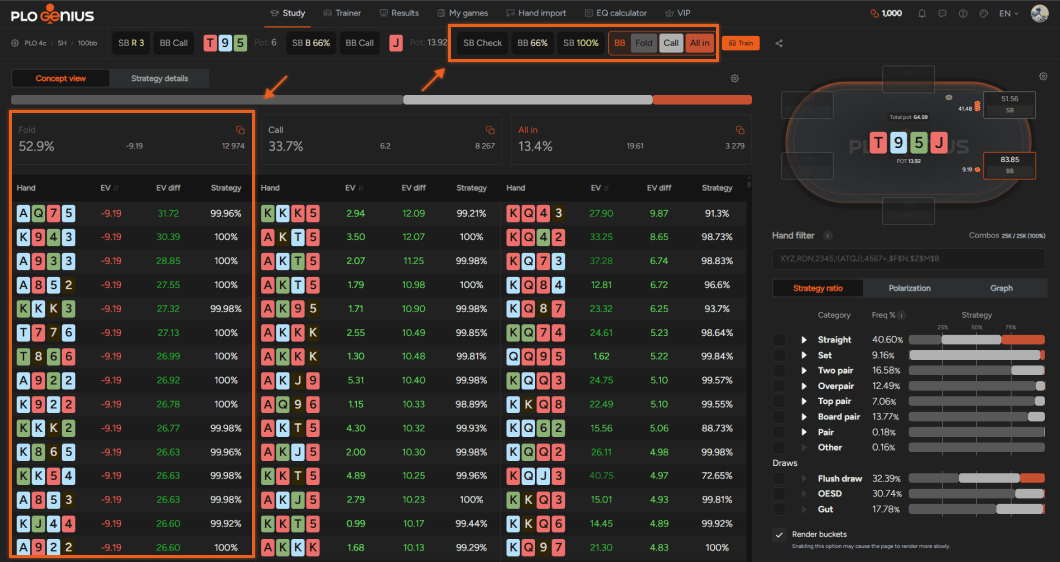
To get a better understanding, examine the strategy ratio to see how different hand classes are played in this spot. Selecting the flush draw category, for example, lets you see which hands bet and fold to a raise and which are strong enough to play for stacks.
The second step is to return to the point where your opponent checked to you and switch to the Strategy Details view. Here, you can compare the expected value of betting and checking individual combos. This helps you identify the hands with the strongest incentive to bet, whether for value, as a bluff, or for a combination of reasons.
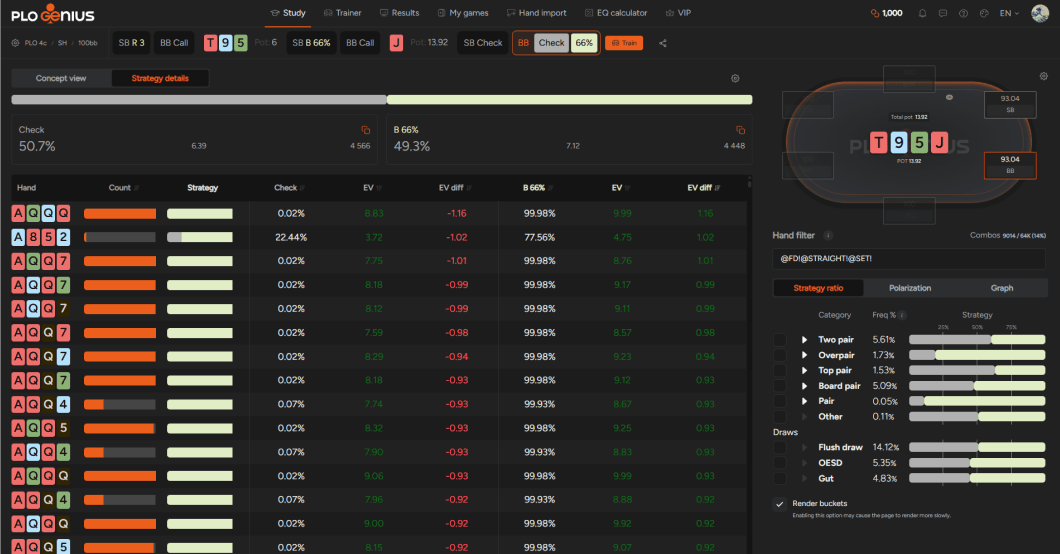
Continuing with our earlier example, the hands without a straight or a set that gain the most EV from betting rather than checking often have the nut flush draw or contain an Ace and at least one Queen. The nut flush draw leaves second-nut flush draws unblocked, while a Queen blocks KQ, the nut straight on this board.
If you move to the node where you bet and the Small Blind raises, you can identify the threshold for continuing against that raise: which hand characteristics make the difference between a bet/fold and a bet/call.
Use the Polarization Chart to See How a Bucket Is Played
This connects with another useful way to study hand categories: the Polarization view. By looking at the chart for a particular bucket, you can see patterns in how hands within that category are played, rather than examining each combo individually.
Hands are arranged from weaker to stronger: the further right a hand sits within the bucket, the closer it is to the top of that range.
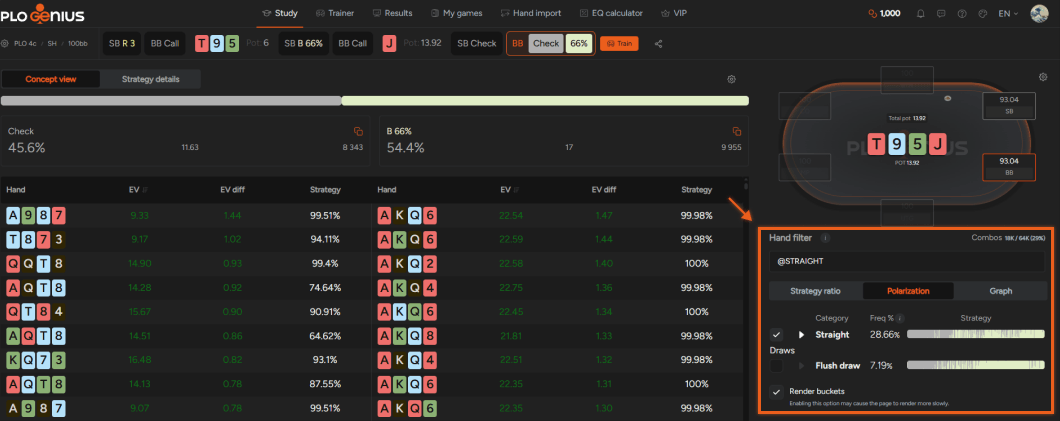
Returning to our earlier example, if you filter for straights, you’ll quickly notice that the lowest straight - 87 combos - almost always checks, while the nut straight, KQ, almost always bets.
This gives you a quick overview of how a particular bucket is played, helping you identify broader patterns across a whole hand category. In this spot, overpairs are another interesting category to examine: their strategy depends heavily on which hands they block and unblock, rather than on raw equity alone.
Use the @naked Filter
With four hole cards, the distinction between made hands and draws is less clear in PLO, as many hands fit both categories at the same time. To help you separate them, the @naked filter shows only hands with no draws.
How does it work in practice?
Continuing with our example, let’s return to the turn after the Small Blind checks. We can compare sets with and without draws to see how the additional equity affects their strategy.
If you select the Set bucket without applying the filter, the solver bets two-thirds pot 43.6% of the time.
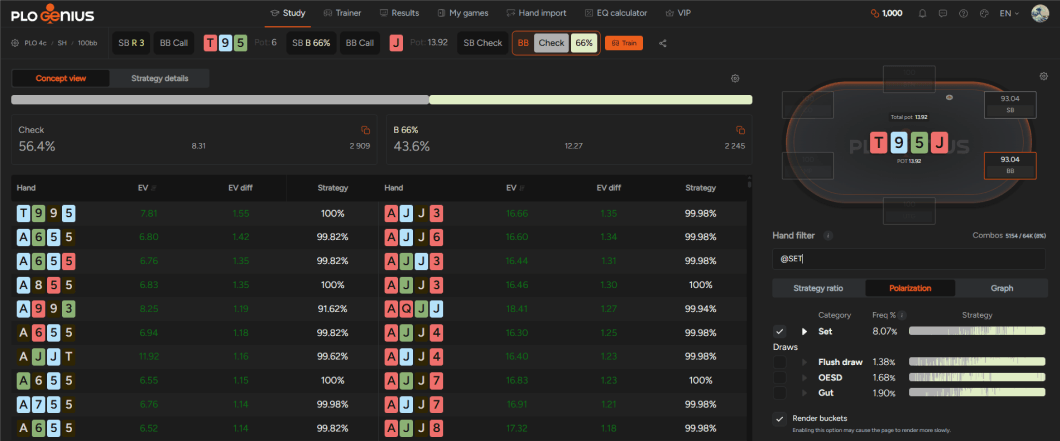
What happens when we add the @naked filter to exclude sets with draws? The strategy shifts toward checking more often:
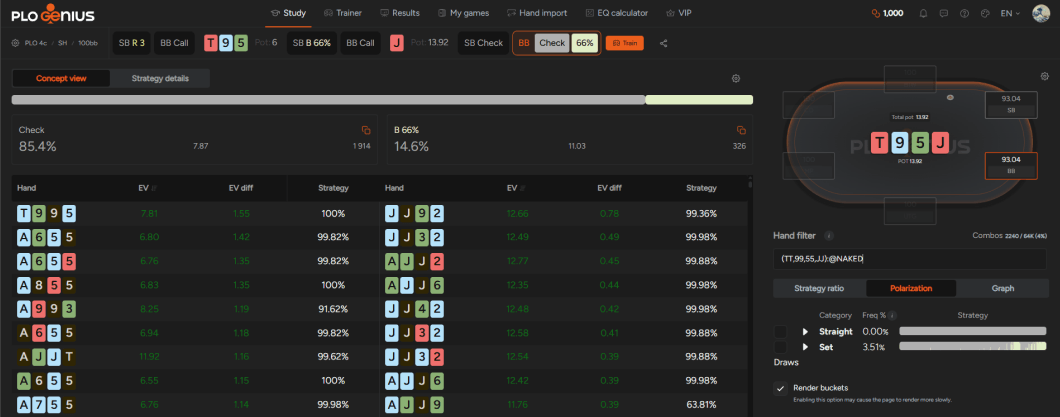
In this filtered group, your sets have no additional straight or flush draws. The displayed EV values are lower - 7.87 for checking and 11.03 for betting, compared with 8.31 and 12.27 in the previous view - but these figures summarize different groups of hands. The clearest difference is the betting frequency, which drops from 43.6% to 14.6%.
Even without examining individual combos, these two screens show how much additional draws influence the betting strategy on this board. With several straights already possible and a flush draw available, most sets without draws prefer to check back.
The @naked filter helps you isolate these hands and see how their strategy differs from that of the full category.

More Ways to Improve Your Study Sessions
These tips cover just some of what you can do with PLO Genius. Importing your hands helps you identify recurring preflop mistakes, while the postflop views and filters make it easier to spot patterns and understand how different hands fit into your strategy.
That’s not all: we’ll explore more features and practical study methods in a future article. In the meantime, visit our pricing page to compare plans and find the one that fits your study needs.

Subscribe to our newsletter
Stay up to date with our new features
Join our community on Discord!
Want to learn more about PLO?
Catch up on our latest articles, updates, and insights

How Rake Changes Your PLO Preflop Strategy: Low vs. High Stakes
Does higher rake mean you should play tighter in PLO?

How Stack Depth Affects PLO Preflop Strategy
What changes preflop when stacks go from 100bb to 200bb in PLO: RFI, 3-betting in and out of position, with numbers from the Compare tool.
Same Hand, Different Table: What Actually Changes Your PLO Strategy
Same hand, different rake or table size: the Compare tool shows which hands change their preferred action and by how much EV, with a PLO50 vs PLO5000 example.
