Learn From Your PLO Hands!


Every poker format evolves continuously, and Pot-Limit Omaha is no exception. As players improve and strategies become more refined, the tools used to study the game must evolve alongside them. This philosophy has guided the development of PLO Genius from the start, and it is the reason behind one of the platform's newest additions: the hand import feature.
The hand import tool can meaningfully enhance your study process.
At its core, hand import is designed to do one thing well: allow you to compare decisions made in real hands with GTO-based solutions, and identify where — and by how much — your play diverged from optimal strategy.
How to import your hands
Using the feature is intentionally straightforward. You upload your own hand histories (hand histories from all major rooms and trackers; the full list is in the import dialog), configure a few settings, and let the system match your hands to the appropriate simulation pool.
During the upload process, you can currently adjust the following options:
- Decode format, specifying the hand history format
- Preferred simulation type, which determines the simulation pool used for matching
- Matching rake, allowing the analysis to reflect the rake structure of the game you played
You can upload any number of hand histories at once, including multiple files — the system will automatically merge them into a single dataset.
Once the upload is complete (usually within seconds for smaller batches), you're taken to a results screen similar to the one shown below.
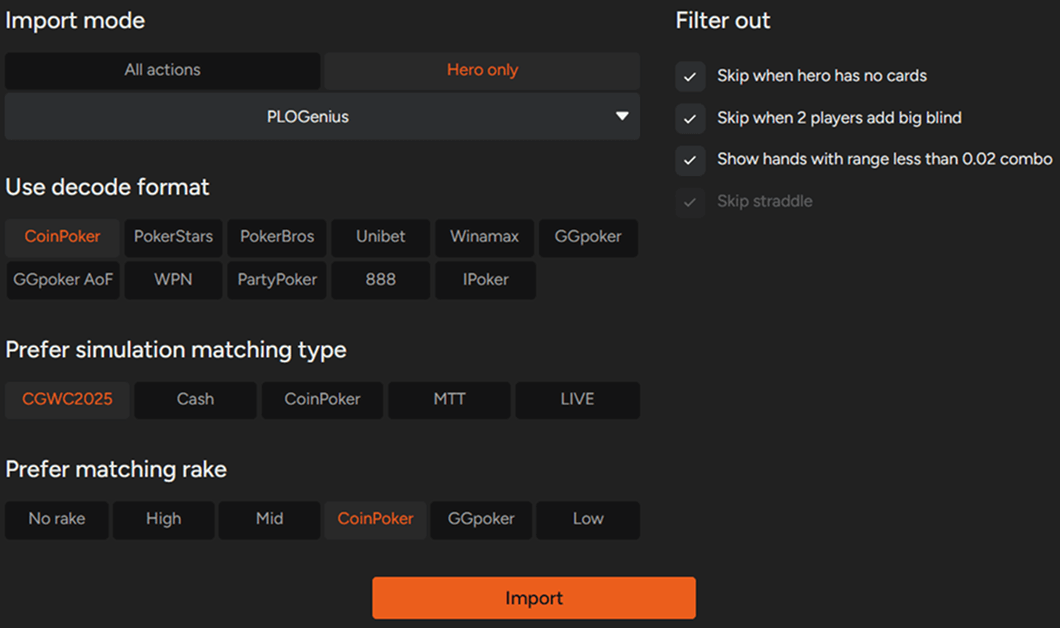
How to learn from the hands you've played?
At first glance, the amount of information can seem overwhelming, so it's useful to look at each section separately.
On the left side of the screen, you'll find a list of all uploaded hands. For each hand, you can see your hole cards, the board, the full action sequence, and the EV loss attributed to the hero's decisions.
EV loss is the key metric here, as it allows you to quickly identify hands where your play diverged the most from GTO recommendations.
Let's look at the sample hand:
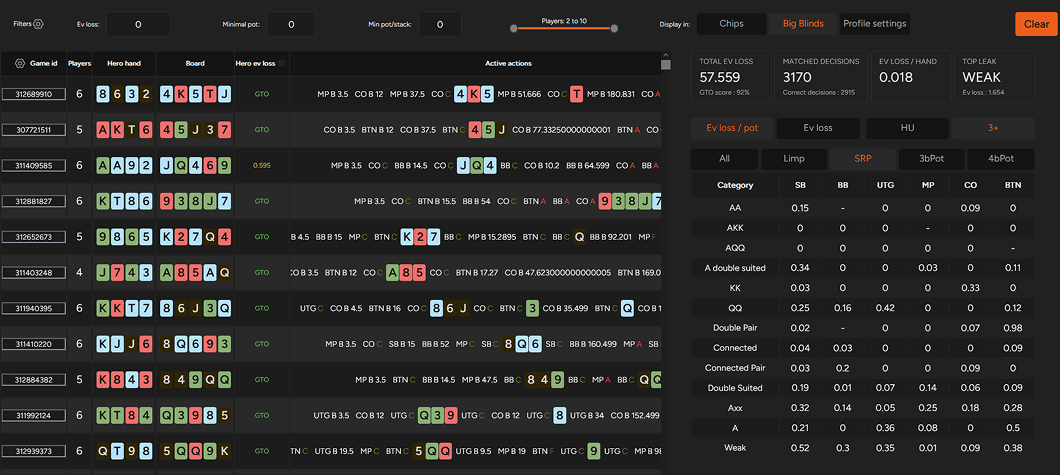
In this instance, the hero holds KKT7 and squeezes after an UTG open and a CO overcall. UTG folds, CO responds with a re-raise, and the action returns to the hero, who moves all-in.
Both hero decisions are represented by bars beneath the hand:
- The upper bar corresponds to the initial squeeze, which aligns with the GTO strategy.
- The lower bar represents the all-in decision, which deviates from GTO and results in an EV loss. In this spot, calling would have been the higher-EV option.
For each decision point, you can click the Study button, which takes you directly to the relevant node in the simulation, where you can:
- Compare the EV of different actions for your exact hand
- See how other hands should be played in the same situation
The second part of the hand import tool is displayed on the right.
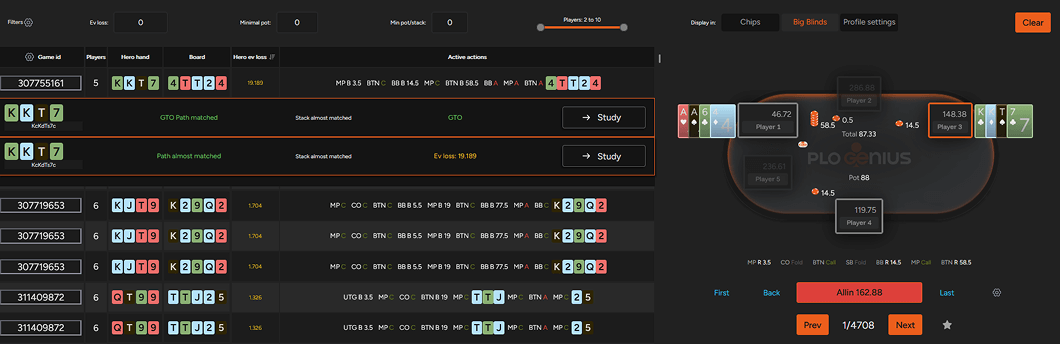
The right side of the screen contains a summary table covering all decisions made across the imported hands. This section shows:
- Total EV lost compared to GTO
- The number of decisions that matched GTO recommendations
- Average EV loss per hand
- Hand categories that deviated the most from optimal play
- You can further filter and group hands based on whether they were played heads-up or multiway, and by pot type (limped, single-raised, 3-bet, or 4-bet pots).
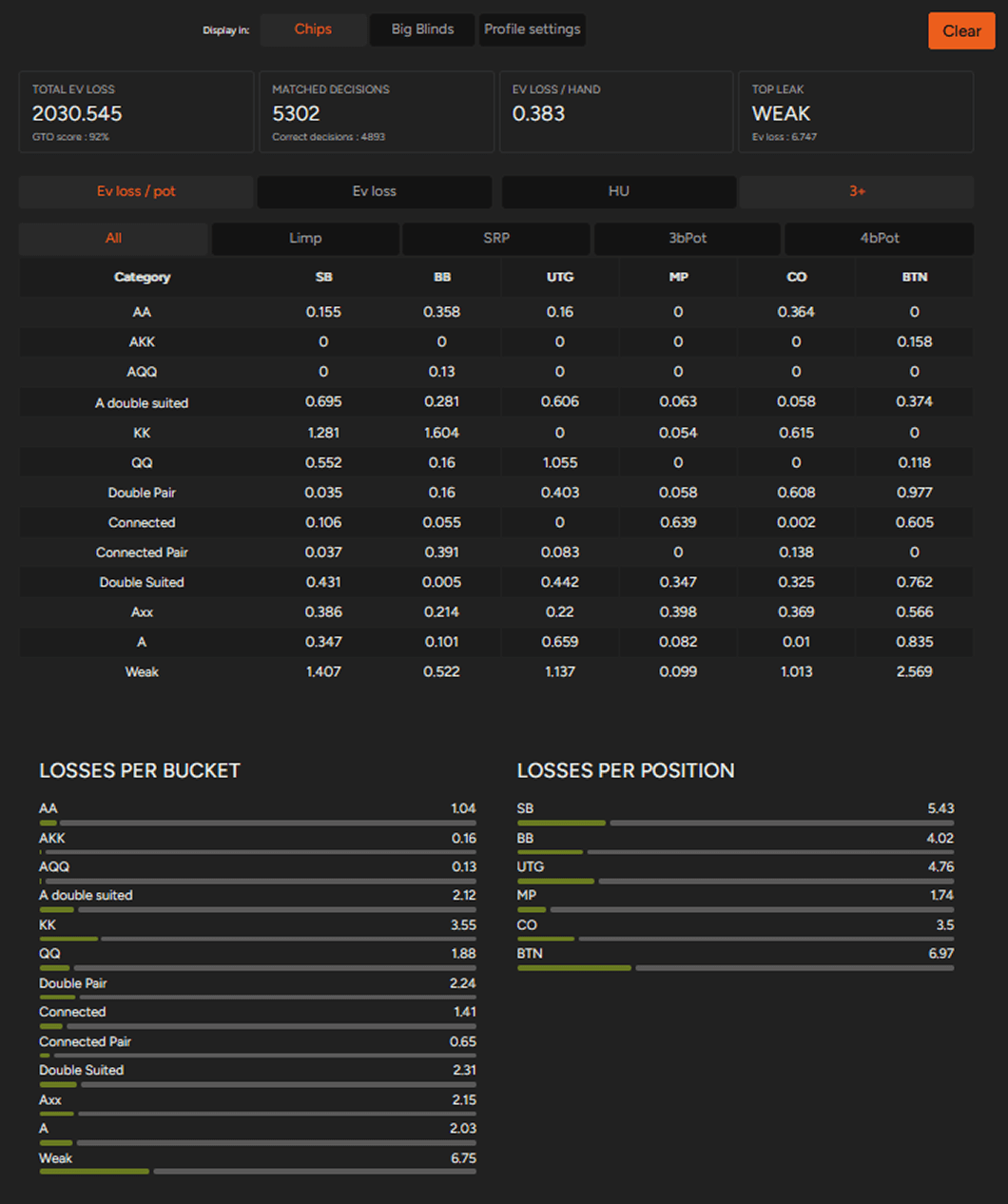
The final part of this section provides aggregated data showing EV loss by hand bucket, as well as deviations from GTO across different positions.
If a hand from your sample lands on a board you want to study deeper, you can solve any flop, turn or river on demand; for patterns across whole board textures rather than single hands, see aggregated reports.
We're working on both functionality and looks of the hand import!
The hand import tool already provides actionable insight into common decision-making leaks.
Our current priorities are further improving its functionality and refining the interface to make the hand import experience clearer and more user-friendly.
To start analyzing your own hands with hand import, upgrade to the PRO plan. If you want to try the app first, the free Starter plan covers 100bb preflop for heads-up and 6-max, in four-card and five-card PLO, with the trainer and no time limit; hand import itself is a PRO feature. See what else is inside the PLO solver.

Subscribe to our newsletter
Stay up to date with our new features
Join our community on Discord!
Want to learn more about PLO?
Catch up on our latest articles, updates, and insights

How to Get More Out of PLO Genius
Get more out of your PLO Genius study sessions with these practical tips.
How Rake Changes Your PLO Preflop Strategy: Low vs. High Stakes
Does higher rake mean you should play tighter in PLO?

How Stack Depth Affects PLO Preflop Strategy
What changes preflop when stacks go from 100bb to 200bb in PLO: RFI, 3-betting in and out of position, with numbers from the Compare tool.
